

Written by Allen Wyatt (last updated February 15, 2021)
This tip applies to Excel 97, 2000, 2002, and 2003
At the bottom and right side of the worksheet there are scroll bars that control what part of the spreadsheet you are viewing at any given time. If you need more room to view a worksheet, or if you are using Excel without a mouse, you can turn them off. To control display of the scroll bars, follow these steps:
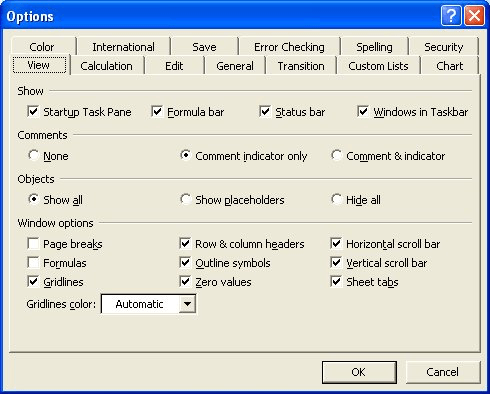
Figure 1. The View tab of the Options dialog box.
With the scroll bars turned off, you must use the cursor control keys to move through the worksheet.
ExcelTips is your source for cost-effective Microsoft Excel training. This tip (2644) applies to Microsoft Excel 97, 2000, 2002, and 2003.

Dive Deep into Macros! Make Excel do things you thought were impossible, discover techniques you won't find anywhere else, and create powerful automated reports. Bill Jelen and Tracy Syrstad help you instantly visualize information to make it actionable. You’ll find step-by-step instructions, real-world case studies, and 50 workbooks packed with examples and solutions. Check out Microsoft Excel 2019 VBA and Macros today!
Determining the length of a text string is easy, but figuring out how many pixels are represented by those characters is ...
Discover MoreGraphics are a great addition to a worksheet, but there may be times when you don't want them printed. The easy way to ...
Discover MoreYou can spice up your bar chart by using a graphic, of your choosing, to construct the bars. This tip shows how easy it ...
Discover MoreFREE SERVICE: Get tips like this every week in ExcelTips, a free productivity newsletter. Enter your address and click "Subscribe."
There are currently no comments for this tip. (Be the first to leave your comment—just use the simple form above!)
Got a version of Excel that uses the menu interface (Excel 97, Excel 2000, Excel 2002, or Excel 2003)? This site is for you! If you use a later version of Excel, visit our ExcelTips site focusing on the ribbon interface.
FREE SERVICE: Get tips like this every week in ExcelTips, a free productivity newsletter. Enter your address and click "Subscribe."
Copyright © 2026 Sharon Parq Associates, Inc.
Comments